
Looks like Outlook.
Answers to you.
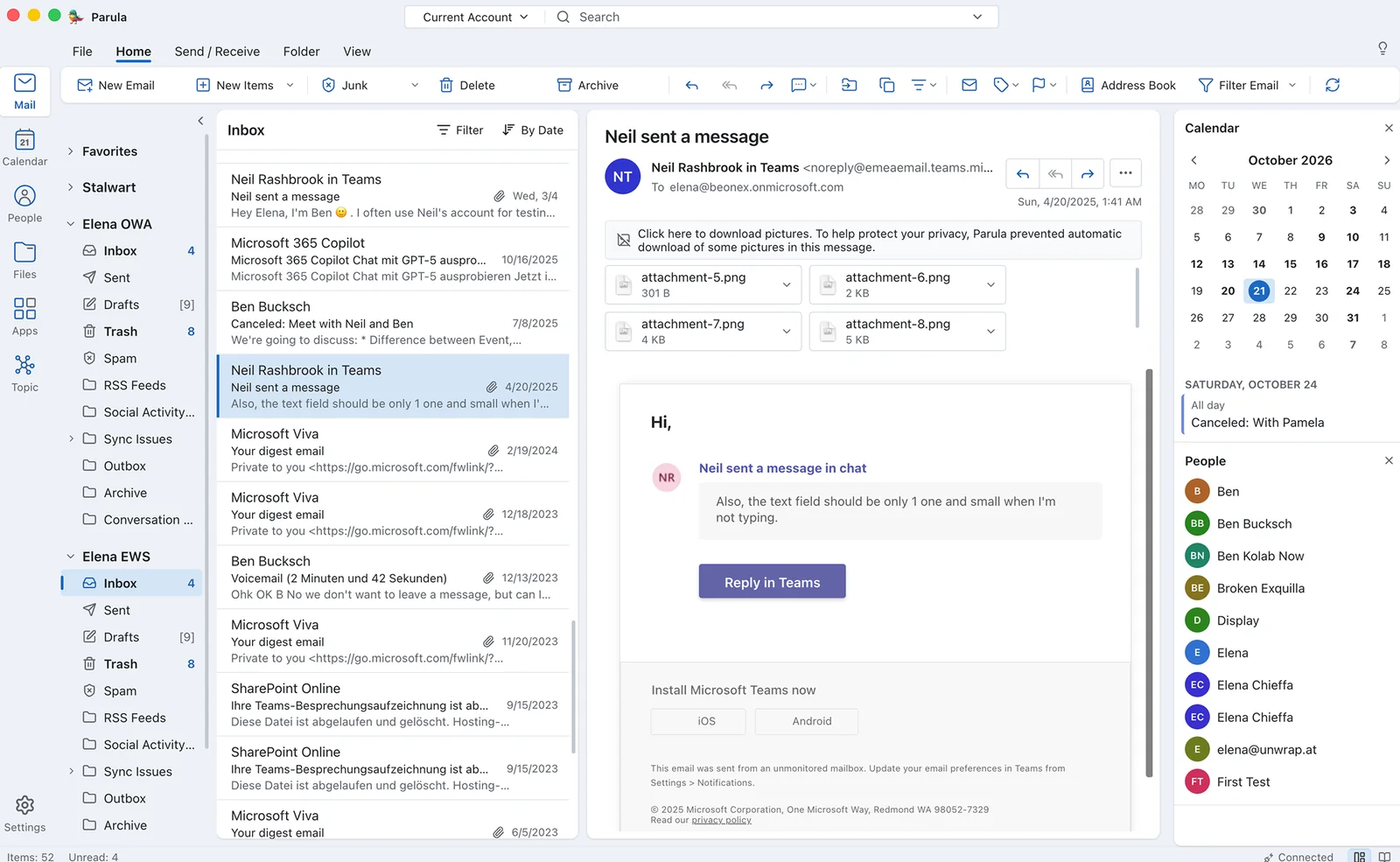
Lookout gives your people the ribbon, the folders and the shortcuts they have used for years. Underneath, it is open source, built on open standards, and keeps your mail on your own computers and servers.
Why Lookout
Moving away from Microsoft rarely fails in the data center. It fails at the desk, when people lose the habits of years, the helpdesk phone keeps ringing and the project stalls. Lookout keeps the habits and replaces everything underneath.
Keep your habits.
At the desk
For people who work in Outlook all day
-
Everything is where you left it
File, Home, Send / Receive, Folder and View. The ribbon groups have the names you know: New, Delete, Respond, Move, Tags and Find.
-
Your shortcuts still work
Ctrl+R replies, Ctrl+Shift+M starts a new email and Ctrl+2 opens the calendar. Press Alt and the KeyTips appear on the ribbon.
-
The dialogs you know
The Rules Wizard, Search Folders, Color Categories, Check Names, the Scheduling Assistant, and your Digital IDs in the Trust Center.
-
All your mail in one window
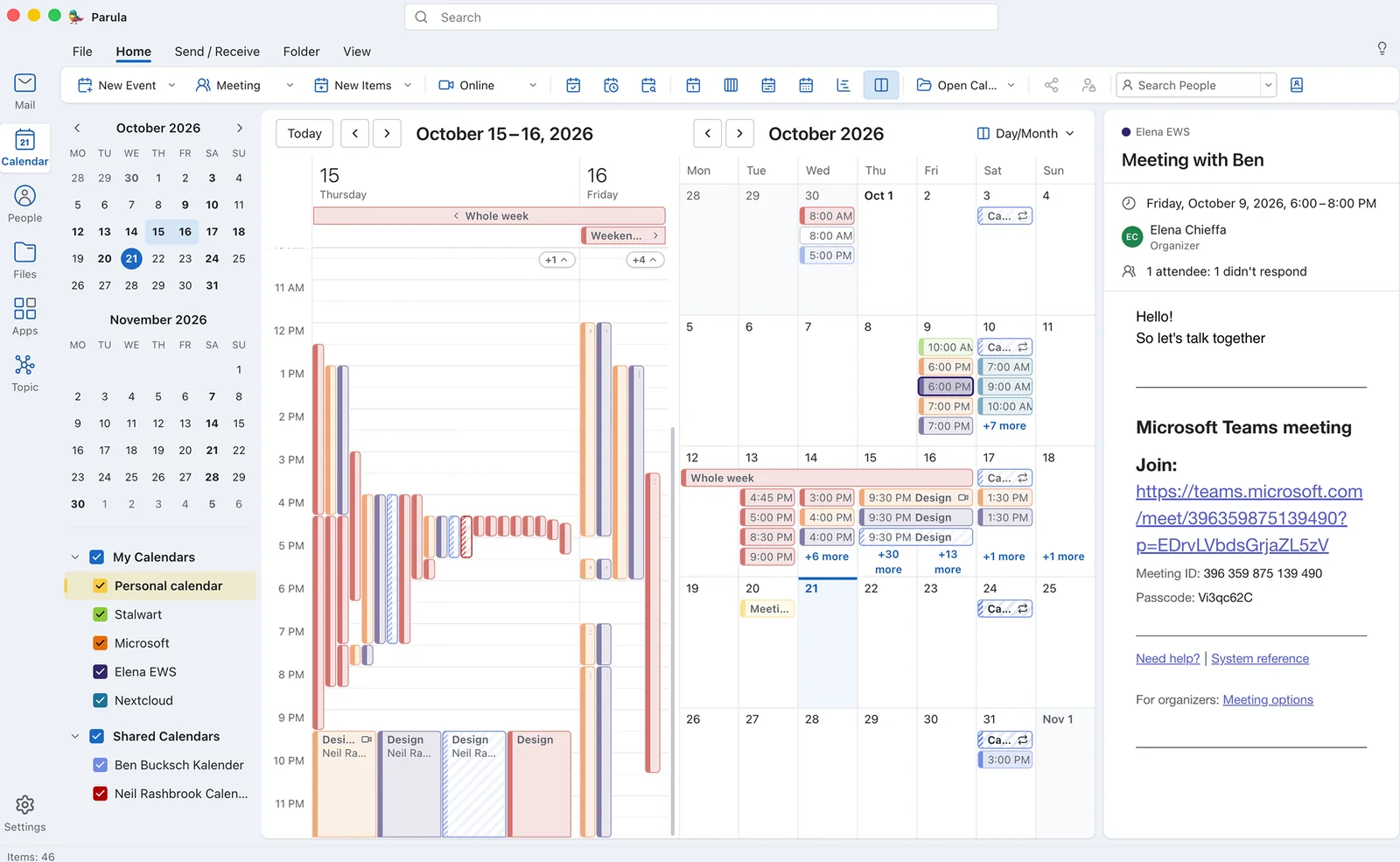
Your work account, a shared team calendar and your private mailbox side by side. Favorites show the inboxes of all accounts together.
-
Meetings work with everyone
Invitations go back and forth with people on Outlook, Exchange, Microsoft 365, Google and Apple.
-
Ready for something new?
The modern interface of Mustang is one setting away, with the same accounts and the same mail.
Own your data.
In the server room
For the IT department
-
Freedom to choose the server software
Lookout works with Exchange and Microsoft 365, and with every server that speaks the open standards JMAP, IMAP, CalDAV and CardDAV, such as Stalwart, Nextcloud or openDesk. You choose the server software that fits your organization, and you can change it later.
-
No cloud in between
Mustang connects each computer directly to your servers and keeps the data on the computer. Your mail never passes through our servers or any other service in between.
-
No retraining
Training and support calls are what make a new mail client expensive. With Lookout, the first day on the new client looks like the last day on the old one.
-
Move the client first, the server later
Switch the desks to Lookout while Exchange keeps running. Move the mailboxes later, on your own schedule. People keep the same window through both moves.
-
Source code under a European license
Mustang is open source under the EUPL 1.2, the license of the European Commission. Read it, audit it, build it yourself. The license lists the few proprietary exceptions, such as the Exchange connectors.
-
Linux included
Lookout runs on Windows, macOS and Linux. An Outlook-style desktop no longer requires Windows.
-
Setup without a manual
People type their email address and password. Mustang finds the server with Autoconfig, which its developers created, and with Exchange AutoDiscover.
-
A European vendor
Mustang is made by Beonex GmbH in Germany, by long-time Thunderbird developers.
Try it here
Your fingers already know it
Lookout answers to 64 keyboard shortcuts from Outlook. Click into the box and press the ones you use every day.
Click here, then press a shortcut
0 of 64 tried
Everywhere
Writing an email
Calendar
Some keys belong to your browser, such as Ctrl+N. Click those in the list. On a Mac, press Cmd where the list says Ctrl.
Side by side
Lookout vs. Outlook
| Capability | Outlook | Lookout |
|---|---|---|
| Exchange on-premise & Microsoft 365 | Yes | Yes - EWS, Graph, OWA, ActiveSync |
| Delegated & shared mailboxes | Yes | Yes |
| Scheduling with free/busy | Yes | Yes |
| S/MIME encryption | Yes | Yes |
| Mail rules | Yes | Yes |
| OpenPGP with Autocrypt | No | Yes |
| JMAP mail, calendar, contacts | No | Yes |
| CalDAV / CardDAV | No | Yes |
| Chat (XMPP, Matrix, Signal, WhatsApp) | No - separate Teams app | Built in (coming soon) |
| Video meetings & phone calls | Via Teams | Built in - WebRTC, SIP (coming soon) |
| Where non-Microsoft account data syncs | Microsoft Cloud (new Outlook) | Your device only |
| Native Linux app | No | Yes - deb, rpm, AppImage, flatpak |
| Source code | Closed | Open, on GitHub |
Standards first
Built on open standards, so your mail, calendars and contacts work with any compatible server and are never locked into one vendor.
Open source
The code is public, so anyone can check what happens to your data, and your mail never depends on one company’s decisions.

Powered by Mustang
Created by the people behind Thunderbird’s mail core and Owl for Exchange. If you can read TypeScript, you can read how your mail client handles your mail.
Who we are and why we do itFrom the people who built Owl, these are the companies that trust us
Government and science




Technology






Research






University





Finance and Press





Funding

 Some parts funded by NLnet. Thank you!
Try it on one desk
Install Mustang, switch to Lookout in the settings and add your account. It takes a few minutes, and switching back takes one click.